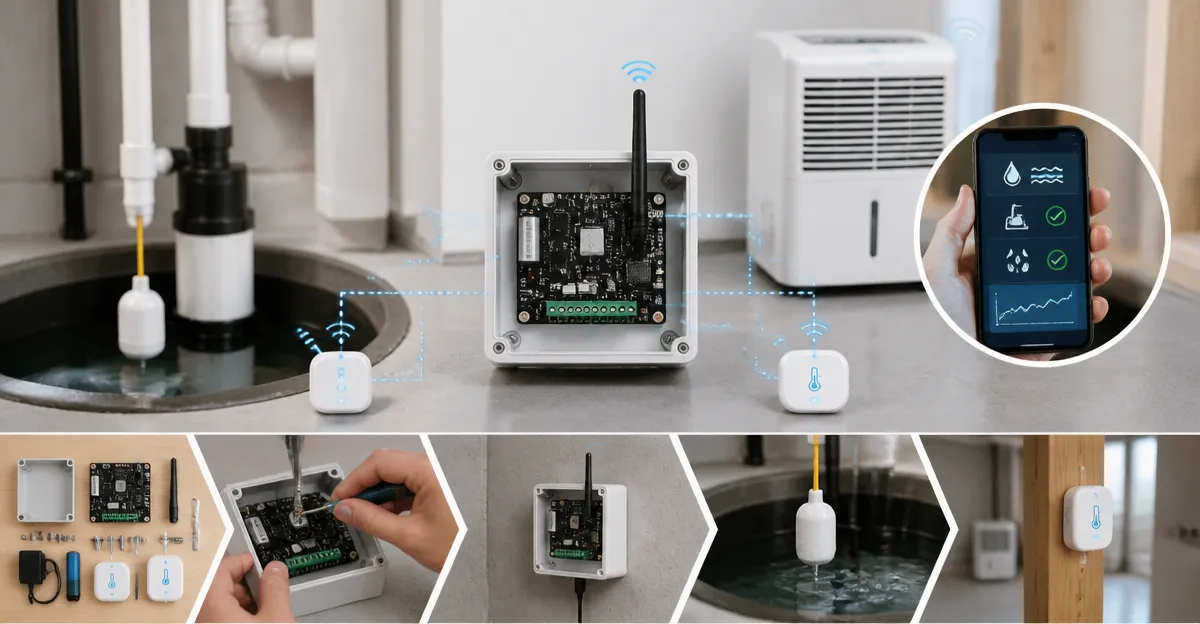
Introduction
This guide explains how to construct a dependable smart flood alarm hub that monitors a sump pump and a dehumidifier. Readers will learn how to select appropriate sensors, configure a long‑range hub, and create automated alerts that prevent costly water damage. The approach combines inexpensive hardware with cloud‑based notifications, offering a scalable solution for both homeowners and renters. By following the steps, one can achieve peace of mind while protecting critical equipment from unexpected leaks.
What You'll Need
- Basement Watchdog Water Alarm – $14.98, 4.7★ rating, detects 1/32 in. of water, 110 dB alarm.
- GoveeLife Smart Water Leak Detector (3‑Pack) – $39.99, 4.2★ rating, 105 dB alarm, 1804 ft connectivity.
- YoLink Water Leak Starter Kit – $54.99, 4.6★ rating, LoRa hub with four silent sensors.
- Standard 9 V batteries (for devices that require them).
- Power drill, screwdriver, zip ties, and basic electrical tape.
- Smart plug compatible with your home automation platform (optional for controlling the dehumidifier).
Step 1: Assess Flood‑Prone Locations
Begin by identifying all areas where water intrusion could affect the sump pump or dehumidifier. Typical locations include the basement floor near the pump, the dehumidifier base, utility closets, and any pipe junctions that run beneath the home. Create a simple floor plan and mark each potential leak source with a pencil. This visual map will guide sensor placement and ensure comprehensive coverage.
When assessing, consider both slow drips and sudden surges, such as a burst pipe or a backed‑up sewage line. A slow drip may not trigger a traditional float switch, but a sensitive electronic sensor will detect the moisture early. Document the distance from each sensor location to the nearest power outlet, as this influences the choice between battery‑operated and wired devices.
Step 2: Install a Primary Audible Alarm
Place a dedicated audible alarm in a location where the sound can be heard throughout the residence. The Basement Watchdog Water Alarm is ideal because it emits a 110 dB tone that penetrates walls and ceilings. Its solid‑state circuitry detects as little as 1/32 inch of water, providing an early warning before damage escalates.
Mount the sensor component using the included 6 ft extension wire, positioning it directly on the floor near the sump pump discharge pipe. Secure the main unit on a wall at a convenient height, ensuring the 9 V battery is accessible for annual replacement. Test the alarm by briefly touching the two sensor prongs; the device should sound immediately, confirming proper operation.
This alarm serves as a backup to smart notifications, guaranteeing that occupants who are not near a smartphone still receive an audible cue. Compared with generic smoke detectors, the water alarm is specifically calibrated for liquid detection, reducing false alarms caused by humidity.
Step 3: Deploy Smart Leak Sensors for Continuous Monitoring
To achieve real‑time alerts, install the GoveeLife Smart Water Leak Detector (3‑Pack). Each sensor offers 1804 ft of Sub‑1G wireless range, allowing reliable communication even through multiple walls and concrete. The sensors provide SMS, app, and email notifications, and they feature a 105 dB alarm that can be adjusted in four volume levels.
Place one sensor directly beside the sump pump motor, a second under the dehumidifier base, and a third near any nearby water heater or washing machine. Use the included 5‑year battery to avoid frequent replacements; the battery life is rated for up to five years under normal conditions. After installation, download the GoveeLife app, create an account, and add each sensor by following the on‑screen pairing instructions.
Within the app, configure multiple reminder methods: enable push notifications, set up an email distribution list for family members, and optionally activate SMS alerts (the service is free for the first few messages). Adjust the alarm volume to a level that is audible in the bedroom but not disruptive during nighttime. The “Find Device” feature can be used to locate a misplaced sensor by triggering a brief audible beep.
For larger properties, the 5‑Pack version provides additional coverage at a modest price increase. However, the 3‑Pack is sufficient for most standard basements and offers a cost‑effective entry point.
Step 4: Install the YoLink LoRa Hub and Silent Sensors
The YoLink Water Leak Starter Kit supplies a LoRa hub and four silent leak sensors that communicate without reliance on Wi‑Fi. LoRa technology penetrates concrete and metal, delivering reliable signals up to a quarter‑mile in open air. This is particularly valuable for deep basements where Wi‑Fi signals degrade.
Connect the hub to a power outlet and download the YoLink app. During the initial setup, scan the QR code on the hub to pair it automatically. Once the hub is online, add each silent sensor by pressing the pairing button on the device; the app will display the sensor name and allow you to assign a location such as “Sump Pump Basin” or “Dehumidifier Tray”.
Because the sensors are silent, you may wish to add a YoLink SpeakerHub or a conventional siren to provide an audible alert. The hub can also trigger a smart plug that powers off the dehumidifier automatically when a leak is detected, preventing the device from operating in wet conditions.
Configure the hub to send push notifications, email alerts, and optional SMS messages. YoLink also supports integration with Alexa, IFTTT, and Home Assistant, enabling advanced automations such as turning on a sump pump backup battery when a leak is reported.
Step 5: Create Automation Between Sensors, Hub, and Equipment
With the sensors and hub in place, the next step is to design automation rules that protect both the sump pump and the dehumidifier. In the YoLink app, create a rule that when any leak sensor reports moisture, a notification is sent to your phone and the YoLink hub activates a connected smart plug. The smart plug should be linked to the dehumidifier, causing it to shut off instantly.
If you use a smart plug that integrates with your preferred voice assistant, you can also issue a voice command to check the status of the leak sensors. For example, saying “Hey Alexa, is the basement dry?” will query the YoLink hub and return the current sensor state.
For the sump pump, consider adding a secondary relay that powers a backup pump when the primary pump fails. The YoLink hub can trigger this relay based on a leak detection event, ensuring that water does not accumulate while you arrange professional service.
Document each automation rule in a spreadsheet, noting the trigger, action, and notification method. This documentation simplifies future troubleshooting and allows you to expand the system as new devices are added.
Step 6: Test, Calibrate, and Maintain the System
After installation, conduct a comprehensive test by simulating a water leak at each sensor location. Use a wet towel or a small container of water to wet the sensor surface and verify that the audible alarm, app notification, and automation actions all occur as expected. Record the response time for each alert; a delay longer than 10 seconds may indicate interference or a weak battery.
Calibrate sensor sensitivity if the app provides such an option. Some environments with high humidity may generate false positives; reducing sensitivity slightly can mitigate unnecessary alerts. Replace the 9 V batteries in the Basement Watchdog and Geevon devices annually, and schedule a battery check for the YoLink sensors every six months.
Finally, review the firmware updates for each device on a quarterly basis. Manufacturers often release improvements that enhance connectivity, battery life, and security. Applying updates promptly ensures that the system remains reliable over the long term.
Tips & Pro Tips
- Label each sensor with its assigned location using waterproof stickers; this simplifies future maintenance.
- Mount the YoLink hub in a central location away from metal objects to maximize LoRa range.
- Use zip ties to secure extension wires neatly along the wall, preventing accidental tripping.
- Enable two‑factor authentication on the GoveeLife and YoLink apps to protect your notification channels.
- Consider adding a battery‑backed UPS for the hub to maintain alerts during power outages.
Troubleshooting
| Problem | Possible Cause | Solution |
|---|---|---|
| No notification received | Sensor battery depleted | Replace the 9 V battery or 5‑year battery in the affected device. |
| Intermittent signal | Wi‑Fi interference or weak LoRa signal | Reposition the hub closer to the sensor or add a signal repeater. |
| False alarm due to humidity | Sensor sensitivity too high | Adjust sensitivity settings in the app or relocate sensor to a drier area. |
| Hub offline after power loss | Hub not connected to UPS | Connect hub to a battery‑backed UPS or ensure it restarts automatically. |
Conclusion
This guide has demonstrated how to build a DIY smart flood alarm hub that safeguards a sump pump and dehumidifier using affordable, high‑quality sensors and a LoRa hub. By following the six steps, one can achieve continuous monitoring, instant alerts, and automated shutdowns that reduce the risk of water damage. The recommended products—Basement Watchdog Water Alarm, GoveeLife Smart Water Leak Detector (3‑Pack), and YoLink Water Leak Starter Kit—provide reliable detection, long‑range communication, and flexible automation. Implementing this system offers a cost‑effective insurance policy that protects both property and peace of mind.
Products Mentioned in This Guide
Frequently Asked Questions
What components are required to build a DIY smart flood alarm hub?
You need water leak sensors (e.g., Basement Watchdog, GoveeLife, YoLink), a LoRa or Wi‑Fi hub, and a power source for the sump pump and dehumidifier.
How does a LoRa hub improve flood detection reliability?
LoRa provides long‑range, low‑power communication that reaches sensors throughout a basement, ensuring alerts even in thick walls.
Can the system send notifications to my phone?
Yes, most smart leak detectors integrate with cloud services or mobile apps to push real‑time alerts via push notifications or SMS.
What water level triggers an alarm in the recommended sensors?
The Basement Watchdog alarms at 1/32 in. of water, while GoveeLife and YoLink detect similar minimal leaks, typically around 0.03 in.
Is the DIY flood alarm hub suitable for renters?
Absolutely; it uses inexpensive, battery‑operated sensors and a plug‑in hub, requiring no permanent wiring or structural changes.